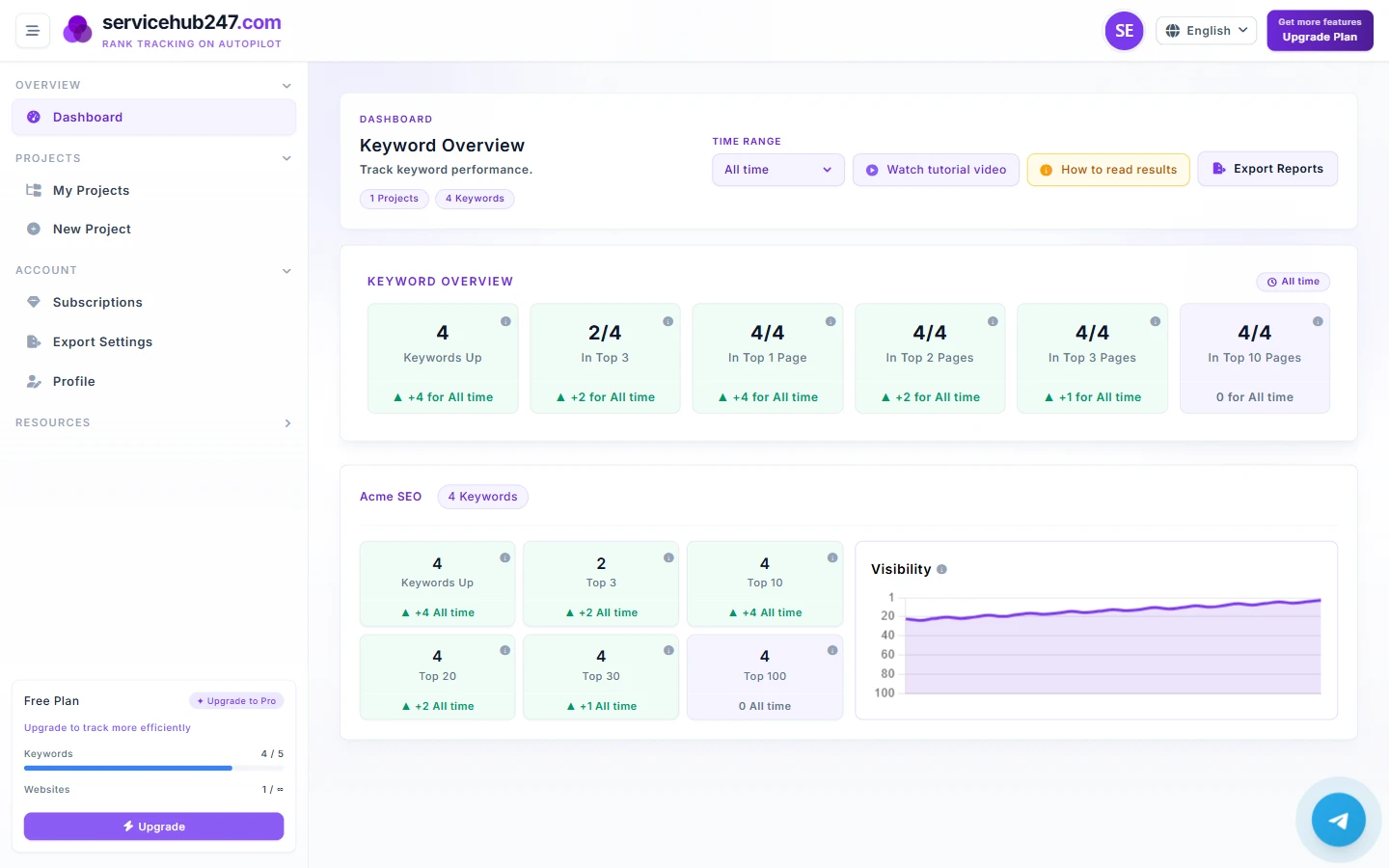
The Keyword Overview strip at the top of the Dashboard is six square cards - they're the central numbers every SEO decision on Servicehub247 starts from. Ahrefs, SEMrush, and Moz all have variations of these metrics (Top 3, Top 10, Top 100), but each tool computes the delta differently. This guide breaks down each card - what it counts, the formula, the edge cases, and the right reaction when the badge changes color.
Anatomy of a KPI card
Every card has three parts:
- Big number (center): the latest snapshot, shown as X/Y = "X keywords in this bracket / Y total tracked keywords".
- Label below the number (e.g. "In Top 1 Page").
- Delta badge ▲/▼ at the bottom with a number: the net change in the selected timeframe - green if positive, red if negative.
Critical rule - the big number doesn't change when you switch timeframe. Only the delta badge reacts.
Card 1 · Keywords Up
Counts: keywords whose latest in-window position is better (smaller number) than their first in-window position.
Formula: count(keywords WHERE latest_position < first_position within timeframe).
Badge: (keywords improved) − (keywords worsened) within timeframe.
Edge case: keywords with only 1 crawl in the window don't count (no "first" to compare against).
Action: overall health indicator. Green ▲ = positive momentum; red ▼ for 2+ weeks → audit the whole portfolio rather than fix individual keywords.
Card 2 · In Top 3
Counts: keywords with current position 1–3.
Why it matters most: organic CTR at Top 3 is typically 25–40% (Top 4–10 is 3–10%). A keyword entering Top 3 brings 5–10× the clicks of position 7.
Edge case people miss: if a keyword moves from position 5 to position 2, "Keywords Up" increments AND "Top 3" increments. One event counted in multiple cards - by design, not a bug.
Action: highest priority when ▼. Losing one Top 3 keyword = losing real traffic. Open keyword detail to see whether a competitor passed you.
Card 3 · In Top 1 Page (Top 10)
Counts: keywords at position 1–10 - all of Google's page 1.
Why it matters: page 1 vs page 2 is the CTR cliff - position 10 gets ~2% clicks, position 11 gets ~0.5%. Dropping from 10 to 11 loses ~75% of your clicks despite "only -1 position".
Action: Card 3 is the most directly business-relevant. When stakeholders ask "is SEO working?" - answer with this card.
Card 4 · Top 20 / Card 5 · Top 30
Counts: position 1–20 and 1–30 respectively.
Why included: these are leading indicators. A keyword at position 14 doesn't drive meaningful traffic yet, but it's 1–2 on-page tweaks away from page 1.
Action: use Top 20/30 to pick next week's content roadmap - keywords here without strong dedicated content are the cheapest places to invest.
Card 6 · Top 100
Counts: total keywords with any ranking 1–100 - basically "keywords still successfully tracked".
Edge case: keywords that never had a ranking don't count. Unlike Cards 1–5 (which count by bracket), Card 6 counts "has ranking at all".
Action: watch the long trend (6 months / year timeframe). If Top 100 declines faster than the other cards → multiple keywords getting deindexed or penalized.
Comparison summary
| Card | Counts | Most useful for |
|---|---|---|
| Keywords Up | Net keywords improving | Overall health check |
| Top 3 | Position 1–3 | Protecting revenue keywords |
| Top 10 | Page 1 keywords | Stakeholder reporting |
| Top 20 | First 2 pages | Next week's content roadmap |
| Top 30 | First 3 pages | Long-term opportunity pipeline |
| Top 100 | All ranking keywords | Watching for deindex/penalty |
Recommended reading order
- Glance at Keywords Up - overall health. Green or red?
- Check Top 3 then Top 10 - where revenue impact actually lives.
- Then Top 20/30 - what's worth investing in next.
- Finally Top 100 - long-term tracking health.
Don't read left-to-right. The best 60 seconds is by ROI: Up → 3 → 10 → 20/30 → 100.